Components
Mendable Search Bar
Before install, make sure you have either signed up through our platform or we have provided you with the ANON_KEY. Without the key, you won't be able to setup the search component.
Mendable Search Bar
The search bar is a component similar to an search bar input. When the user clicks the search bar, it will open a modal with Mendable Search.

Usage
import { MendableSearchBar } from "@mendable/search"

const style = { darkMode: false, accentColor: "#123456" }

<MendableSearchBar anon_key='YOUR_ANON_KEY' style={style} />
Keyword Search
We also provide keyword search as seen on the Langchain Documentation. This combines keyword with AI Search in one modal. When the user starts typing, it will almost instantly display results for the search query. It also allows the user to use AI search by pressing "Ask Mendable AI".
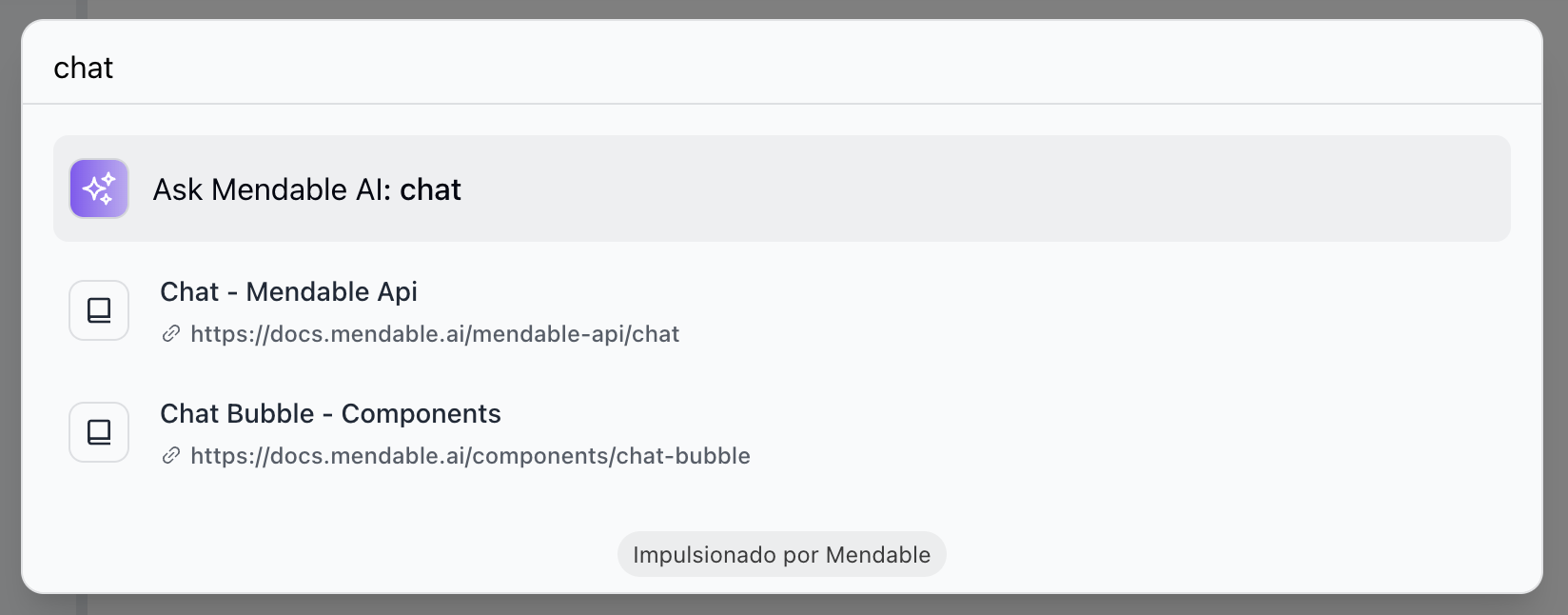
To enable keyword search, you need to pass the showSimpleSearch prop to the component.
import { MendableSearchBar } from "@mendable/search"

<MendableSearchBar anon_key='YOUR_ANON_KEY' showSimpleSearch />
Props
| Prop | Type | Default | Description |
|---|---|---|---|
| anon_key (Required) | string | - | Mendable Search ANON_KEY |
| placeholder | string | "Search..." | Placeholder text for the searchbar |
| context | string | false | Additional context to be passed to the AI |
| dialogPlaceholder | string | "How to deploy my application?" | Placeholder text for the mendable bot input bar inside the modal window |
| style | object | - | Style object |
| style.darkMode | boolean | false | Dark mode |
| style.accentColor | string | "#123456" | Accent color |
| style.backgroundColor | string | "#123456" | Background color |
| welcomeMessage | string | "Hi, how can I help you?" | Welcome message |
| cmdShortcutKey | string | "k" | Define the short cut for users to open mendable with. By default, it is CMD + K or CTRl + K |
| botIcon | object | Bot Emoji | React: Bot icon HTML tag, can be a img, svg or any other HTML tag, Vanilla JS: image url |
| userIcon | object | User Emoji | React: User icon HTML tag, can be a img, svg or any other HTML tag, Vanilla JS: image url |
| showSimpleSearch | boolean | false | Show simple search bar option on the top |
| positionOverwriteClassname | string | - | Classname that helps overwrite the position of the floating button |
| messageSettings.openSourcesInNewTab | boolean | false | Open sources in new tab |
| messageSettings.prettySources | boolean | false | Display the sources by title / sub-section instead of long URL |
| messageSettings.hideSources | boolean | false | Hide the sources |
| privacyDisclaimer | string | " " | Privacy disclaimer text |
| footer | object | - | Footer object |
| footer.bottomRightLink | object | - | Bottom right button object |
| footer.bottomRightLink.label | string | "" | Text label for the bottom right button |
| footer.bottomRightLink.link | string | "" | URL for the bottom right button |
| language | string | "" | Defaults to user's personal settings. Anything else will overwrite the language for all users. Languages available: pt,es,fr,it,nl,de,ja |
| onMessageForTracking | function | - | Callback function that triggers when a message is sent. It receives the question and answer as parameters |
| onSourceClickedForTracking | function | - | Callback function that triggers when a source is clicked. It receives the source as a parameter |
| onSwitchingSearchType | function | - | Callback function that triggers when the search type is switched. It receives the type as a parameter |
Callback functions
The Mendable Search Bar provides callback functions for tracking events inside the component.
- onMessageForTracking : This function is triggered whenever a message is sent in the component. The function receives the question and the answer as parameters. This can be used for logging or analytics purposes.
Example
import MendableSearchBar from 'mendable-search-bar';

function MySearchComponent() {
  const handleOnMessage = (question, answer) => {
    console.log("User asked:", question);
    console.log("Received answer:", answer);
    // You can add additional tracking or analytics logic here.
  };

  return (
    <MendableSearchBar
      anon_key="YOUR_ANON_KEY"
      onMessageForTracking={handleOnMessage}
    />
  );
}
- onSourceClickedForTracking : This function is triggered whenever a source is clicked in the search results. The function receives the source as a parameter. This can be used for logging or tracking user interactions.
Example
import MendableSearchBar from 'mendable-search-bar';

function handleOnSourceClicked(source) {
  console.log("User clicked on source:", source);
  // Add tracking or logging logic here
}

<MendableSearchBar
  anon_key='YOUR_ANON_KEY'
  onSourceClickedForTracking={handleOnSourceClicked}
/>
Use these functions to gain insights into how users are interacting with the search bar.