Integration Guides
Product Copilots
What is a product copilot?
A product copilot is a Mendable component that is trained to answer questions about your product that take in dynamic application context. It is trained on your product's documentation, and can be deployed anywhere within your App.
What's the difference between a copilot and a normal QA AI?
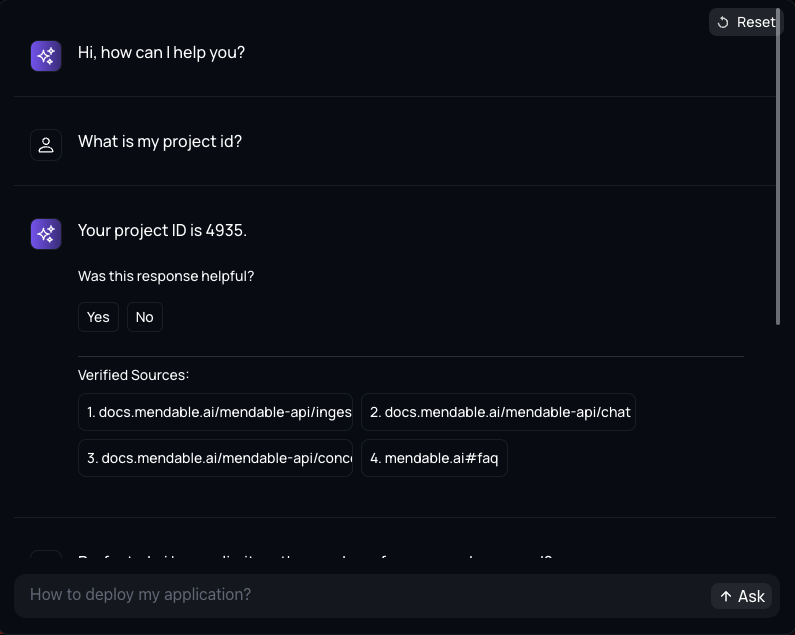
Application context. With a copilot you can feed users' details, page details of the application, and other dynamic information to the AI to get personalized answers.
Implementing a product copilot
Before install, make sure you have either signed up through our platform or we have provided you with the ANON_KEY. Without the key, you won't be able to setup the search component.
1. Importing a component
Import any component into your React application. For this example let's suppose the component is inside the user settings page of an application.
npm i @mendable/search@latest
import { MendableFloatingButton } from "@mendable/search"

const style = { darkMode: false, accentColor: "#123456" }

const floatingButtonStyle = {
    color: "#fff",
    backgroundColor: "#123456"
}

<MendableFloatingButton
    anon_key='YOUR_ANON_KEY'
    style={style}
    floatingButtonStyle={floatingButtonStyle} />
2. Passing application context
To pass in dynamic context to the AI, we can use the context parameter in the component. Here you can send details such as the user settings so the AI is aware of it.
import { MendableFloatingButton } from "@mendable/search"

const style = { darkMode: false, accentColor: "#123456" }

const floatingButtonStyle = {
    color: "#fff",
    backgroundColor: "#123456"
}

<MendableFloatingButton
    anon_key='YOUR_ANON_KEY'
    style={style}
    floatingButtonStyle={floatingButtonStyle}
    context={
        "Here are user details to help you answer user's specific questions: "
        + "user_id: " + user.id,  + "\n"
        + "user_name: " + user.name,  + "\n"
        + "user_email: " + user.email,  + "\n"
        + "project_id: " + project.id,  + "\n"
    } />
3. That's it!
Play around with the component and see how useful it is for your use case. You can put the component in multiple pages to have multiple additional contexts and leverage page information to get personalized answers.